Blog post
Insights
Send Emails Automatically: A 2026 Guide for Shopify Brands
You have a welcome email running. You have one cart reminder running. Both have been live for a year, and revenue still behaves like a treadmill: new subscribers convert once, existing customers drift away, and nobody can say which of the two flows earns money.
That's the normal state of automation inside a Shopify store. The platform makes it easy to switch flows on, so the work turns into a checklist of activations instead of a system with states, exits, and a way to prove lift.
Automation isn't a folder of sequences. It's a state machine. Every contact sits in a lifecycle state (subscriber, first-time buyer, repeat buyer, lapsing, suppressed), and each flow has an entry event, an exit event, and a defined reason to stop sending.
Build order matters: authentication and consent first, then flows, then measurement. Skip a step and the later ones quietly stop working.
Deliverability and permission come first because a flow can't recover from a damaged sender reputation. Gmail's bulk sender guidelines define bulk sending as about 5,000 or more messages per day to personal Gmail accounts, require SPF or DKIM from every sender, and require both protocols plus DMARC once you're in that bracket. The same guidance sets out matching forward and reverse DNS records, TLS for transmission, a From domain aligned with the authenticated domain, and a one-click unsubscribe on promotional mail. Below 5,000 messages a day you aren't exempt, you just get less warning when delivery starts failing.
Two failures repeat across almost every account. Brands authenticate the marketing platform's domain and forget their own From domain. And they stack so many SPF includes that lookups exceed the limit, so the record fails outright. For the wider reputation picture, this walkthrough on avoiding the spam folder goes deeper.
The checklist below is the version to keep open while a domain is being warmed.
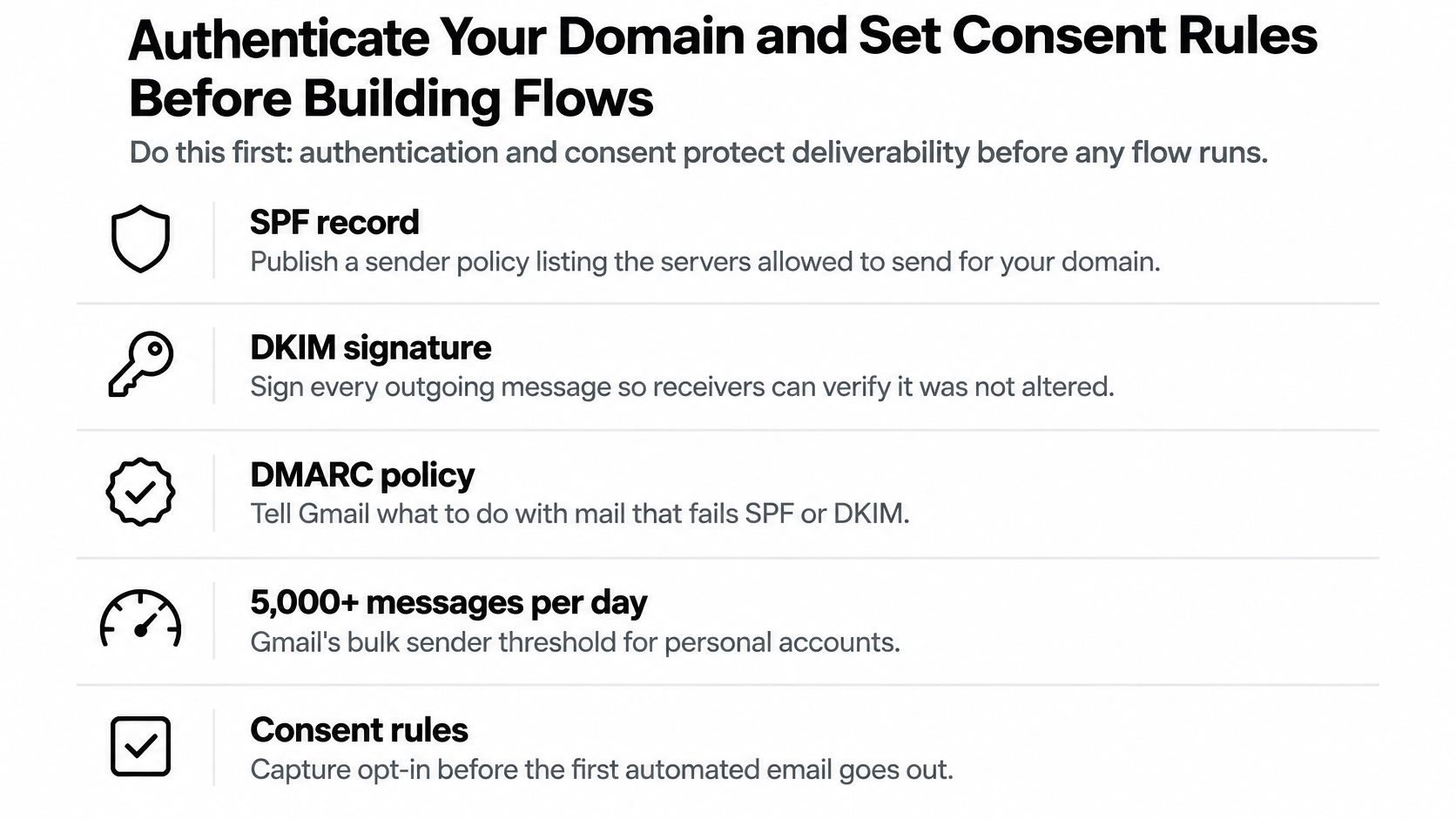
Klaviyo treats email and SMS as separate permissions: email consent does not authorize marketing texts, and a profile without SMS consent has its phone number skipped automatically. Build that into the flow itself rather than into a policy document. Purchased, rented, or scraped lists are prohibited outright under Klaviyo's acceptable use policy, and adding a contact to a list has never been the same thing as holding their permission.
Then layer suppression onto every flow: hard bounces removed on the event, unsubscribes applied globally instead of per flow, and profiles with no open or click in 90 days excluded from promotional sends.
The on-ramp rule: authentication and consent aren't optional polish. They are the on-ramp without which every flow you build will underperform or get blocked.
Picture a Shopify store turning over about $40k a month with exactly two automations live: a welcome email and a single cart reminder. The welcome converts well, the cart reminder recovers a few orders a week, and everyone assumes retention is handled because the dashboard shows two green toggles. Post-purchase, browse abandonment, replenishment, and win-back revenue sits untouched.
Here's the reference set, with the trigger and the default timing I'd start from.
| Flow | Trigger Event | First Email Delay | Typical Sequence Length | Primary Objective |
|---|---|---|---|---|
| Welcome | List signup or popup submission | 0 to 5 minutes | 3 to 5 emails over 7 days | First purchase |
| Checkout Abandonment | Started checkout, no purchase | 1 hour | 3 emails over 48 hours | Recover cart |
| Browse Abandonment | Viewed product, no add to cart | 2 hours | 2 to 3 emails over 3 days | Return to site |
| Post-Purchase Thank You | Placed order | 1 day | 2 emails over 5 days | Reduce buyer's remorse, seed a review |
| Replenishment Reminder | Predicted reorder window elapsed | At the predicted reorder date | 2 to 3 emails over 10 days | Repeat purchase |
| Win-Back | No purchase or engagement for 60 to 90 days | 60 to 90 days after the last order | 3 emails over 14 days | Reactivate the lapsed customer |
The gap that table closes is bigger than most owners expect. A Shopify-cited analysis of more than 156,000 direct-to-consumer customers found an average repeat-purchase rate of 18.8%, which means roughly 81% of customers never placed a second order, and the retention data behind it puts average ecommerce retention at about 38% in a 2024 study, with the right benchmark shifting by category and purchase frequency. Acquisition isn't the leak. The second order is.
Launch Welcome, Checkout Abandonment, and Post-Purchase Thank You first. Those three cover the first 60 days of a customer relationship and generate enough volume to tell you whether the system works.
Then earn the right to build the rest. Once five or six flows are live, they start to collide, which is when a guide to governed workflow coordination becomes useful reading before you add a seventh. Name your states before you draw the flows; this breakdown of customer lifecycle phases is the framework I'd use to label them.
Klaviyo is the working example because it reads Shopify events natively, but the logic transfers to any platform that ingests order and browse data.
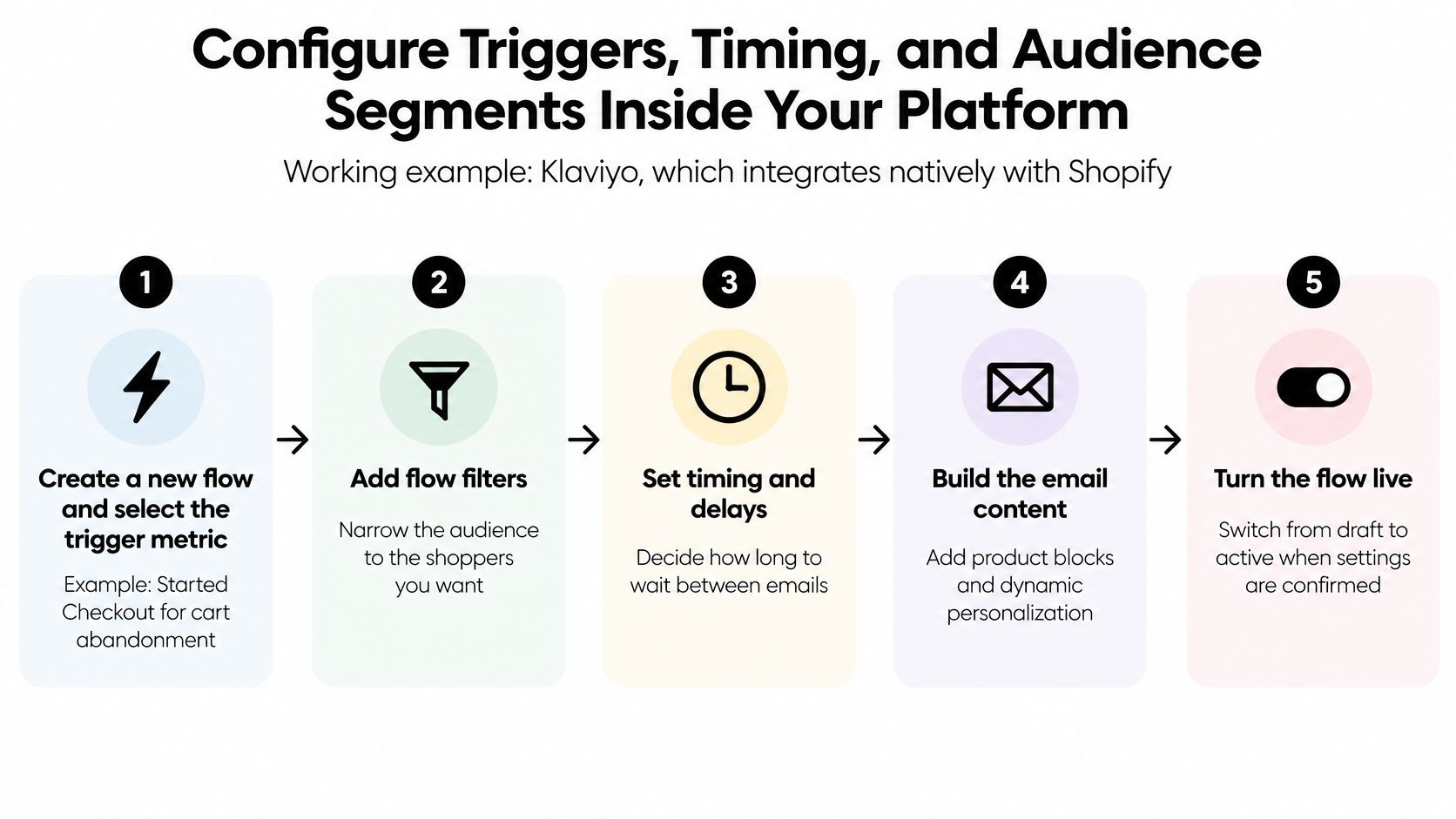
Here's the short version of steps 1 through 3 in practice.
For replenishment and win-back, a predicted next order date or a churn risk score will outperform a hard-coded 30-day wait, because it adapts to each customer's actual cadence instead of assuming everyone consumes at the same rate. Shopify's Returning customers report identifies anyone with two or more orders and shows their order count and average spend per order, which is the cheapest way to check whether your segment definitions match reality.
Sequencing tip: start with broad segments. Narrow only after 30 days of performance data. Over-segmenting a small list starves flows of volume, and low-volume results are statistically meaningless.
If you're coordinating several channels on a fixed schedule, a reference on scheduling settings is worth a skim so send times don't clash.
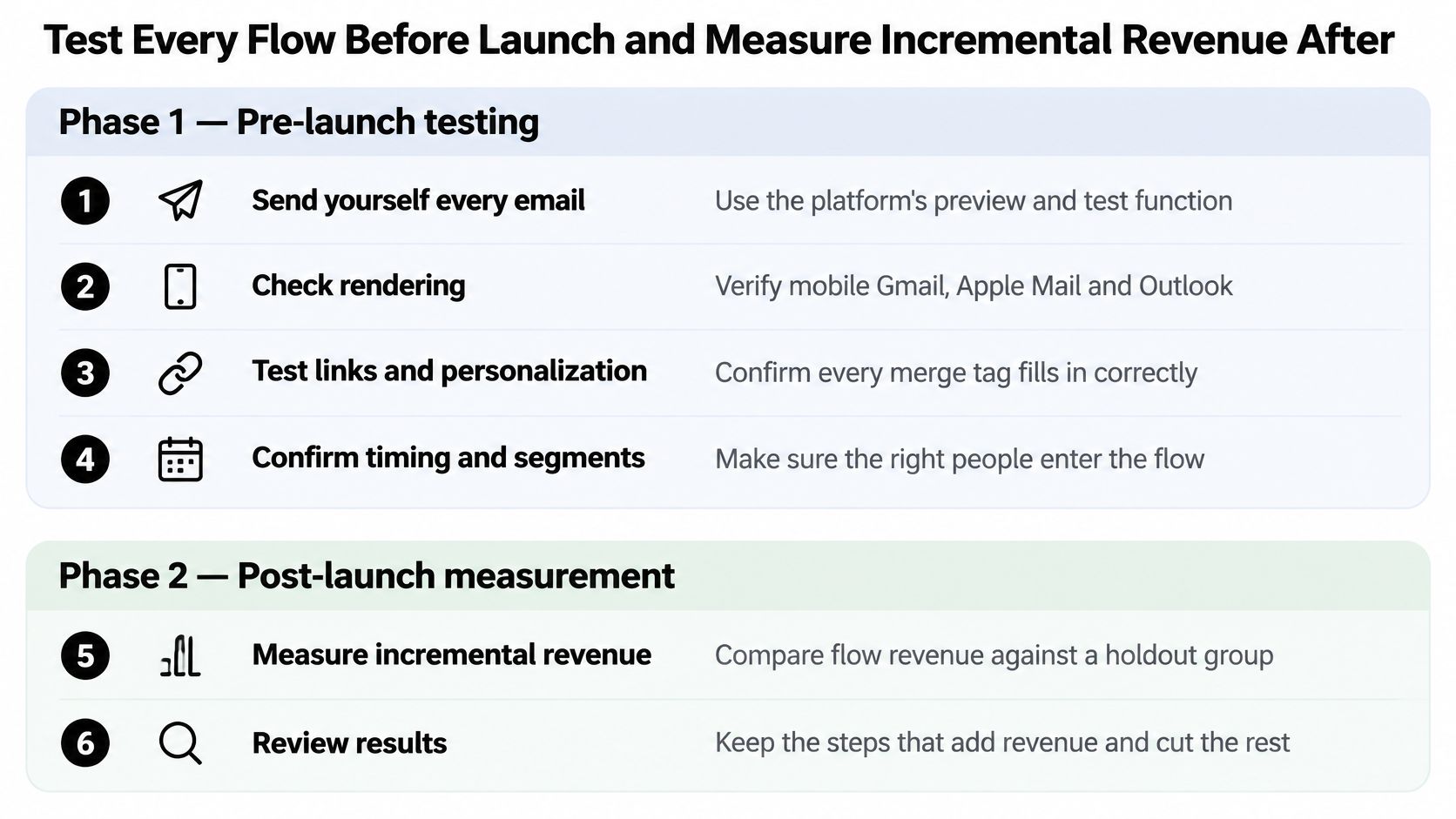
A flow that sends on time proves nothing. Testing has two phases, and most brands do the first badly or skip the second entirely.
That checklist, run in order, catches most of the failures that would otherwise show up as a customer complaint.
Open rates stopped being a control metric when Apple Mail Privacy Protection started prefetching tracking pixels. Watch click-through, conversion, revenue per recipient, and complaint rate instead, and treat the complaint rate as a hard safety constraint rather than a trend line, which is the methodology laid out in Google's guidance on measuring email programs.
Then build the thing almost nobody builds: a randomized holdout. Withhold 5 to 10% of eligible profiles from each flow for a full purchase cycle and compare the two groups.
Say a flow reaches 1,000 eligible profiles this month and you hold back 100. If the 900 who receive it spend $9,000 and the 100 who don't spend $600, the treated group is at $10 per person and the untreated group at $6 per person. The incremental revenue is about $3,600, not $9,000. Every dashboard that reports the higher number is flattering you.
Set a cadence and keep it. Check deliverability daily for the first two weeks of a new flow, then weekly. Review conversion and revenue monthly against the holdout. If complaint rate breaches the working threshold you set at launch, pause the flow and diagnose list quality or message relevance before restarting it.
A flow that sends reliably but cannot prove incremental revenue is just noise with good deliverability.
For the wider picture of which numbers deserve attention, this breakdown of ecommerce key performance indicators is the companion reading.
Most post-launch problems fall into four buckets, and none of them require rebuilding your domain setup to fix.
| Symptom | Likely Cause | Fix |
|---|---|---|
| Emails landing in spam | From domain misaligned with SPF/DKIM, or SPF exceeding 10 DNS lookups | Flatten the SPF record and verify alignment in Google Postmaster Tools |
| Flow not triggering | Shopify metric not syncing, or trigger filter too restrictive | Check integration health first, then remove filters temporarily to isolate the cause |
| Low conversion despite good delivery | Generic messaging that isn't matched to the segment | Add conditional splits by category or value tier and rewrite each branch |
| Duplicate emails from competing flows | No cross-flow suppression | Add a global filter excluding anyone who received a promotional email in the last 24 hours, plus exit conditions that remove purchasers from every promotional flow |
Two hygiene rules prevent a large share of these. Ramp new domain volume gradually, starting around 500 sends a day and doubling weekly, so reputation builds before the first big campaign. Audit the list quarterly and permanently remove contacts with zero engagement across 120 or more days, which is a deeper cut than the promotional suppression you set at flow level.
The broader environment is getting less forgiving. Recent deliverability guidance points to stricter bulk-sender requirements, AI-assisted inbox filtering, and rising privacy expectations as the forces shaping automated programs, and it's worth reading the benchmark analysis behind that shift if you want the full picture.
Here's the uncomfortable part. Automatic sending is not the same as reliable inbox delivery, and sending more behavior-triggered email can reduce revenue when automation scales faster than permission quality and recipient engagement. A brand that doubles its flow library without touching suppression logic ends up with more complaints, worse placement, and less revenue per send. Suppression logic is a revenue feature, not a compliance chore.
Once a flow can send and exit correctly against a holdout, the question shifts to who keeps it running. Both answers are legitimate, and the deciding factor is attention rather than skill.
Build it yourself when one person can give retention about 10 hours a week, consistently, for six months. Launch Welcome, Checkout Abandonment, and Post-Purchase first, keep authentication current and email consent separate from SMS consent, and review holdout revenue monthly. That's a real program, and at modest volume it's enough.
Skip the in-house route when the same person is also shipping product, running ads, and answering support tickets. Flows don't fail dramatically in that situation. Complaint rate creeps up, copy stops getting tested, and a suppression rule nobody maintained starts leaking.
Ask four questions, and treat a vague answer on any of them as a no.
The middle path suits most Shopify brands: keep strategy and data in-house, hand the build and maintenance to someone who does it weekly. We build done-for-you flows for exactly that situation, and when a client already has flows live, we audit, optimize, and rebuild them rather than starting from a blank slate. If that's the route you're weighing, the Klaviyo agency page sets out how the work is scoped.
Either path exists for one reason. Most first-time buyers never order again unless a maintained trigger gives them a reason to, and that trigger has to keep passing authentication, consent, and measurement checks long after launch day.
Class A Media builds custom Klaviyo email and SMS automation for Shopify brands, from a first welcome sequence to full lifecycle systems with suppression logic and holdout measurement built in. If your automation today is one welcome email and a cart reminder, that's the exact starting point we work from. Visit Class A Media to see how the flows are built and what the process looks like.
Let's build retention system that drive predictable, scalable revenue - without ad spend, without retainers, without guesswork.


The Ultimate Ecommerce Email Marketing Agency
Get in touch: hello@classamedia.com