Blog post
Insights
Email Marketing for Ecommerce: A Revenue-First Guide

Daily email volume reached approximately 361.6 billion messages worldwide in 2024, according to industry figures summarized by PledgeBox. Your store isn't competing for an empty inbox. It's competing for attention against messages customers already expect, recognize, and need.
That changes how you should approach email marketing for ecommerce. The job isn't to send more newsletters or collect impressive open rates. It's to build a revenue system where customer events trigger relevant messages, deliverability protects your reach, and controlled tests show whether those messages create additional profit.
Map these seven lifecycle flows before adding more campaign volume. The timings below are starting configurations to test, not universal benchmarks.
Core ecommerce lifecycle flows
| Flow | Trigger | Commercial Goal | Typical Timing |
|---|---|---|---|
| Welcome series | Newsletter signup or account creation | First purchase | Day 0, 1, 3 and 6 |
| Browse abandonment | Product viewed without adding to cart | Product consideration | 1 to 4 hours after the view |
| Cart abandonment | Cart created but checkout not completed | Recover the checkout | Three-message sequence, timing set in the cart flow build |
| Post-purchase | Order confirmed | Usage guidance and second order | Confirmation immediately, education after delivery, cross-sell after useful product experience |
| Replenishment | Predicted reorder window | Repeat purchase | Based on the customer's average days between orders |
| Win-back | Churn risk rising after a long gap | Reactivate a lapsed buyer | Triggered by churn risk rather than a fixed date |
| VIP loyalty | Top-tier customer lifetime value | Retain high-value customers | Ongoing, with exclusive access |
Each flow serves a different commercial purpose. Welcome messages help an interested subscriber choose; browse messages answer product questions; cart messages remove checkout friction. Post-purchase education helps buyers get value from what they bought, while replenishment, win-back, and VIP communications address different reasons to return.
In the 2023 Litmus State of Email report, 41% of email marketers rated email their most effective channel, and the report cited an average return of $36 for every $1 invested. Those figures establish email's commercial relevance, not a forecast for your Shopify store.
List quality, inbox placement, purchase frequency, product margins, and attribution rules all change the result. A store selling replenishable products has different opportunities from a furniture business, and attributed sales aren't automatically additional sales.
Practical rule: Give every flow a reason to exist beyond reminding someone that your store exists.
For a broader checklist of ecommerce messaging formats, the CartBoss guide to ecommerce email is a useful companion when mapping coverage. Use that map to identify missing customer moments, not to justify sending every available message.
Start with welcome and cart abandonment, where shoppers have already expressed interest. Then add post-purchase education and replenishment to support another order. Develop win-back and VIP flows once purchase history supports meaningful eligibility rules.
Browse abandonment can follow once identity tracking and product-view events are reliable. Don't let it compete with a stronger cart signal.
List the flows your store already runs and mark which of the seven are missing. Beside each existing flow, write its commercial job. If the answer is engagement, sharpen the purpose before expanding it.
A fixed-delay reminder treats a frequent buyer, a gift shopper, and a customer with an unopened multipack alike. Their last purchase date may match, but their reasons to buy again don't.
A value-based model separates the size of the opportunity from the timing of the opportunity. Customer value helps determine how much attention or incentive a shopper deserves; reorder timing helps determine when your message might be useful.
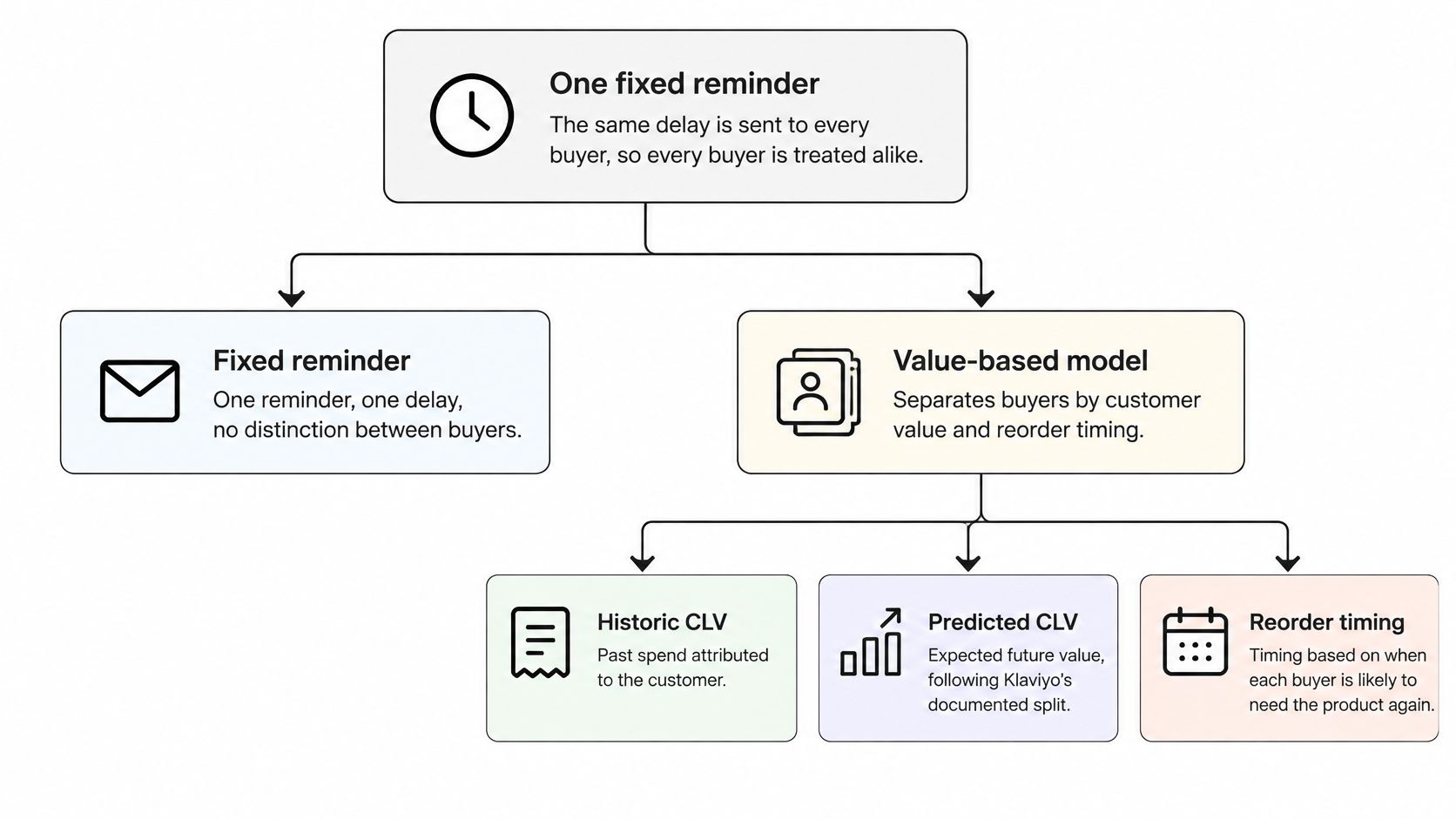
Klaviyo's predictive analytics documentation distinguishes historic CLV, based on prior orders accounting for refunds and cancellations, from predicted CLV, which estimates future spending over a default one-year prediction period; total CLV combines both. Its churn model lowers risk after a purchase and raises it as the gap between orders grows.
That distinction matters. A historically valuable customer may have little immediate need, while a newer buyer may have strong predicted potential. Neither should automatically receive your deepest discount.
Use average time between orders as the reorder clock, then refine it with product context. For example, suppose a skincare brand observes a typical 45-day interval: it could test reminders around days 35 to 40, leaving time for consideration and shipping. A hypothetical furniture business with 120-day purchase gaps needs a different schedule, probably centered on complementary categories rather than replacing the original item.
Consumable categories such as health, wellness, and food and beverage are especially suited to interval-based messaging. Quantity still matters: a subscription shipment or bulk order can make an otherwise sensible reminder premature.
Use a documented email list segmentation framework so segment names correspond to explicit rules, not subjective labels. Keep a fallback category for buyers whose purchase history is too sparse for dependable predictions.
I would start with previous buyers approaching their expected reorder window. Define eligibility using average time between orders and the last purchase date, then exclude customers who have already reordered or have an active subscription covering that need.
An abandoned-cart email sent after payment isn't primarily a copy problem. The automation has acted on an outdated customer state.
Build around an event model that distinguishes product view, cart creation, checkout initiation, purchase completion, refund, subscription status, and predicted replenishment timing. These events inform different decisions; don't treat them as interchangeable proof of purchase intent.

The Twilio email deliverability guide provides an operational foundation for sustainable sending. In your store, translate that discipline into a build process that checks event reliability, eligibility, suppression, and measurement before activating creative.
Recent purchasers of a category can receive complementary-product or replenishment logic. Non-purchasers who repeatedly inspect the same product may need sizing guidance, ingredient information, or an explanation of compatibility instead.
A trigger says something happened. An eligibility check determines whether sending still makes sense.
Keep subscription status explicit. Record marketing permission separately from product-subscription status so a recurring order doesn't accidentally become evidence of channel consent.
SMS flows can use the same customer events and suppression rules as email, but text-message consent needs its own check before sending. This week, pick an abandonment flow and place a test order while you're waiting inside it. Confirm the exit in the actual profile history, not just on the flow diagram.
Bulk sender requirements for promotional email
| Requirement | Threshold | Why It Matters |
|---|---|---|
| SPF and DKIM | Both configured and passing | Verifies the sending domain |
| DMARC policy | At least p=none | Establishes a policy for failed authentication |
| From domain alignment | Aligned with SPF or DKIM | Connects the visible sender to authenticated identity |
| Spam complaint rate | Below 0.3%, target under 0.1% | Protects inbox placement |
| One-click unsubscribe | Present in message headers | Provides the required bulk-sender opt-out mechanism |
| Opt-out processing | Within 2 days | Stops messages to people who have left |
| Bulk sender trigger | More than 5,000 messages per day to consumer addresses | Generally activates the full set of requirements |
Broadcom's summary of Gmail and Yahoo requirements describes the bulk-sender threshold as generally more than 5,000 daily messages to consumer addresses, requires opt-outs within two days, and reports Google's complaint ceiling of 0.3%, with under 0.1% the safer operating target. The table is an operating checklist, not a substitute for checking each mailbox provider's current rules.
Authentication is an engineering constraint. Missing or failing authentication weakens confidence in the sender's identity; poor list practices generate complaints; mailbox providers can respond with filtering, throttling, or rejection.
Have your technical owner verify authentication using actual received messages, not a screenshot showing that records were added. Check whether the visible sender aligns correctly and whether the email platform signs messages as intended.
Then put these controls into routine operation:
An accepted message hasn't necessarily reached a visible inbox. Review placement and commercial response together rather than assuming that every delivered message had an equal chance to earn.
Don't chase a particular inbox tab at the expense of clarity. A promotional message that customers recognize and use is more valuable than one disguised to resemble personal correspondence.
The operational checks in this email deliverability guide help connect sender setup with ongoing list management. Assign ownership for monitoring, incident response, and decisions to pause sending.
Before scaling: Repair authentication failures and complaint problems before increasing campaign volume or activating more flows.
Consider a hypothetical skincare store selling a replenishable cleanser. Its cart flow shouldn't assume every abandoned checkout needs a discount, and its post-purchase flow shouldn't promote another bottle before the customer has tried the first.
Baymard Institute found that 42% of U.S. online shoppers who abandoned a cart were browsing or weren't ready to buy; excluding that group, leading actionable reasons included unexpected extra costs at 40%, slow delivery at 20%, and lack of trust with payment details at 19%. Those are different objections, requiring different answers.

The cleanser brand starts with a cart-item reminder. Its next message clarifies total cost and realistic delivery expectations. The final message explains payment options, returns, and how to contact support, without making unsupported security promises.
Use abandoned-cart subject lines that accurately describe those messages. A subject promising a reserved cart is misleading if inventory hasn't been reserved.
For context, Hello Retail's reporting of Omnisend data puts 2025 automated ecommerce email conversion at 1.49%, versus 0.08% for one-off campaigns, across more than 20 billion campaign emails and 470 million automated sends. Different audience intent contributes to that comparison, so it isn't proof that replacing campaigns with automation will reproduce the gap.
The worked sequence below uses decision-based timing rather than an assumed universal delay.
| Message | Trigger | Branch | Exit Condition |
|---|---|---|---|
| Cart reminder | Eligible cart remains incomplete after the initial waiting period | Show current cart items; low-intent shoppers receive this message only | Purchase, withdrawn permission, or unavailable item |
| Cost and delivery clarification | Cart remains incomplete after the next waiting period | Continue for stronger checkout intent | Purchase or loss of eligibility |
| Trust and returns guidance | Checkout remains incomplete at the final check | Offer relevant reassurance and support | Purchase or sequence completion |
Don't pretend you can identify a casual browser perfectly. Use observable signals to define a low-intent branch, then test whether withholding later messages changes profitable orders.
For the same hypothetical consumable, test day 0 confirmation and care guidance, day 3 usage advice, day 10 a related product, and day 14 a review request. Gate usage and review messages on delivery and sufficient experience; slow fulfillment should postpone them.
The confirmation starts when the order is confirmed. Education branches by the purchased product, the related-product message excludes items already bought, and the review request exits once a review is submitted.
A refund, cancellation, or unresolved product problem should redirect the customer toward support. Asking for another purchase while the original order remains unresolved is the wrong commercial decision.
Rising engagement can hide weak commercial performance. A welcome flow can attract clicks with a generous offer while leaving less contribution margin than a quieter, full-price sequence.
Apple Mail Privacy Protection inflates opens, and Top Growth Marketing's DTC email benchmarks therefore prioritize click rate over open rate. Clicks remain diagnostic signals, not proof of profit.
Revenue-focused email KPIs
| Metric | What It Shows | Use It To |
|---|---|---|
| Unique click rate | Share of recipients who clicked | Judge creative and flow performance |
| Click-to-open rate | Clicks relative to opens | Compare content while treating opens as a weak signal |
| Delivered revenue per eligible recipient | Revenue divided by everyone eligible for the flow | Compare flows of different sizes |
| Incremental repeat-purchase rate | Repeat-purchase rate in the emailed group minus the holdout rate | Establish whether a flow adds orders |
| Contribution margin after discounts | Revenue left after discounts and variable costs | Stop promotions that erode margin |
| Customer lifetime value | Historic plus predicted spend | Prioritize segments and win-back budgets |
| Unsubscribe and complaint rate | Audience fatigue and reputation risk | Set frequency and suppression rules |
| Refund rate | Orders reversed after purchase | Judge profitability of discount-led flows |
For a welcome flow with strong clicks but low-margin orders, inspect the offer, product mix, shipping subsidy, and refunds. Test education-led creative against the discount-led version rather than declaring the higher-clicking version the winner.
For post-purchase email, use a randomized holdout. As a practical test design, reserve 5 to 10% of eligible recipients as a control that doesn't receive the selected marketing flow; leave essential transactional messages intact.
Keep the groups comparable and choose the evaluation window before launch. Compare repeat-purchase rates and contribution margin per eligible customer, accounting for refunds and any differences in other marketing exposure.
Platform-attributed revenue tells you which orders qualified for credit. A well-designed holdout helps estimate which orders the flow added.
Don't declare victory from an undersized test. A small store may need a longer observation period, and a replenishment flow needs enough time for the natural reorder cycle to occur.
Review deliverability, complaints, and clicks weekly as an operating cadence. Review holdout results and customer lifetime value monthly, while keeping longer-running tests open until they're informative.
For teams also managing crowdfunding audiences, PledgeBox's email KPI reporting for Kickstarter creators offers a useful adjacent reporting reference. For ecommerce retention, keep the final decision tied to incremental customer value, not the engagement dashboard.
Choose one flow to build or repair, with a named owner and a defined commercial outcome. A working cart sequence with dependable exits is more useful than a large automation library nobody has tested.
Decide whether your team can own integration checks, copy, design, and testing. A Klaviyo agency can provide done-for-you flows and templates, but you should compare providers on references, reporting access, and their method for distinguishing attributed from incremental revenue.
At Class A Media, we focus only on Klaviyo email and SMS flows. Our flows have generated over $150 million in attributable revenue for ecommerce brands, which is a credential to evaluate, not a promise of incremental lift for your store.
Our Flow Essentials service requires Klaviyo, and we support migration for customers who are open to it. Keep the same evaluation checklist for any provider, including us: platform fit, evidence it can share, accessible reporting, and clearly documented test assumptions.
Make the decision now: test one flow against a control group this quarter, then expand based on profitable customer behavior rather than reported engagement.
Class A Media offers custom Klaviyo email and SMS flows built around ecommerce customer behavior, including post-purchase sequences that encourage repeat purchases. Visit Class A Media to explore done-for-you retention flows and identify the first automation your store should build or repair.
Let's build retention system that drive predictable, scalable revenue - without ad spend, without retainers, without guesswork.


The Ultimate Ecommerce Email Marketing Agency
Get in touch: hello@classamedia.com