Blog post
Insights
Email Marketing Conversion Rate: Benchmarks and Fixes
One campaign can look weak or strong without a single order changing. Divide its orders by delivered emails and you'll get a small number. Divide by clicks and you'll get a number many times larger. That is the core problem with email marketing conversion rate. It's a definition problem first, then a performance problem. Fix the denominator, then judge the result.
Email conversion rate is orders divided by a stated base. Change the base and the same campaign changes. Send 10,000 emails, deliver 9,000, get 600 unique clicks and 45 orders, and you've got 0.50% per delivered email and 7.5% per click. Both are arithmetic. Neither is meaningful until you say what you divided by.
Start with the event. For an ecommerce brand that's usually a placed order, not a click, a reply, or an add to cart. If you're measuring something else, name it.
Next comes the denominator. Delivered emails, unique clicks, and sessions answer different questions, so they produce different rates for the same send.
Then state the attribution window. That's the period after delivery or click during which an order still counts for that email. A longer window credits more orders to email, including some that may have happened anyway.
Practical rule: Write the event, denominator, and window beside every conversion number you share. A rate without those three labels isn't ready for a decision.
| Metric | Formula | What It Tells You | Best Used For |
|---|---|---|---|
| Delivered-recipient conversion | Orders ÷ delivered emails | How much of the list buys | Whole-list and campaign reporting |
| Click-to-purchase conversion | Orders ÷ unique clicks | How well the email persuades people who engaged | Judging the offer and landing page |
| Session conversion | Orders ÷ sessions from email | Buying behaviour once shoppers reach the store | Comparing email with other traffic sources |
| Revenue per recipient | Email-attributed revenue ÷ delivered emails | Money earned per message sent | Ranking flows and campaigns by value |
| Open-based conversion | Orders ÷ opens | Unreliable, since privacy tools inflate opens | Avoid for decisions |
This precision matters because senders rely on the metric. In Mailjet's 2023 Inbox Insights survey of more than 3,200 senders worldwide, 26% identified conversion rate as one of the most important metrics for measuring email program success.
Don't compare a per-click rate with a per-recipient rate and call the gap growth. Don't change the window mid-quarter either. Lock your definitions, keep them visible in the dashboard, and judge every campaign and flow against the same denominator over time.
A benchmark only helps if its denominator, event, audience, and attribution window match yours. If they don't, you're comparing two different calculations. Use the table as a set of reference points, not as a single target.
| Benchmark | Rate | Basis or Scope | Best Use |
|---|---|---|---|
| Cross-industry average email conversion | 1.3% | Mixed campaigns across industries | Rough reference for broad campaigns |
| Ecommerce average, Compass dataset | 5.32% | Ecommerce metrics, attribution method varies | Reference for engaged ecommerce audiences |
| Retail and ecommerce average, 2025 dataset | 2.68% | Retail and ecommerce email | Recent cross-check |
| Automated ecommerce emails, 2022 benchmark | 3% | Automated flows | Target for triggered flows |
| One-off campaigns, Klaviyo data across 183,000+ brands | 0.16% | Placed orders per recipient | Broadcast reference |
| Automated flows, same Klaviyo data | 2.11% | Placed orders per recipient | Flow reference |
| Apparel and accessories, 2019 Mailchimp | 0.11% | Campaign conversion | Fashion category reference |
| Automotive, 2019 Mailchimp | 0.10% | Campaign conversion | Automotive category reference |
| Electronics, 2019 Mailchimp | 0.07% | Campaign conversion | Electronics category reference |
| Food and beverage, 2019 Mailchimp | 0.28% | Campaign conversion | Food and beverage category reference |
A global compilation reports a 1.3% average email conversion rate, a 2.6% click-through rate, a 21.5% open rate, and a separate Compass ecommerce average of 5.32%, according to the cross-industry email benchmark compilation. Those stages aren't interchangeable. Opens show initial attention, clicks show traffic, and conversion shows the desired action.
The 5.32% figure doesn't prove the 1.3% figure is wrong. It's likely built on a different population, denominator, or attribution method. Treat it as a sign to check the method, not as a goal for every broadcast.
Use the 2.68% retail and ecommerce average from the 2025 retail and ecommerce benchmark dataset as a recent cross-check. It still doesn't replace a row matched to your email type.
The older category rows show how small broad campaign conversion can be when measured against the full audience. The 2019 Mailchimp benchmark and 2022 automated ecommerce benchmark report a 2.01% average click rate, category campaign conversion from 0.07% in electronics to 0.28% in food and beverage, and a 3% average for automated ecommerce emails.
Think of a shop assistant who speaks when you pick up a product. Compare that with someone shouting one offer to the whole street. The assistant starts with useful information about what you're doing right now. Automated flows get the same advantage.
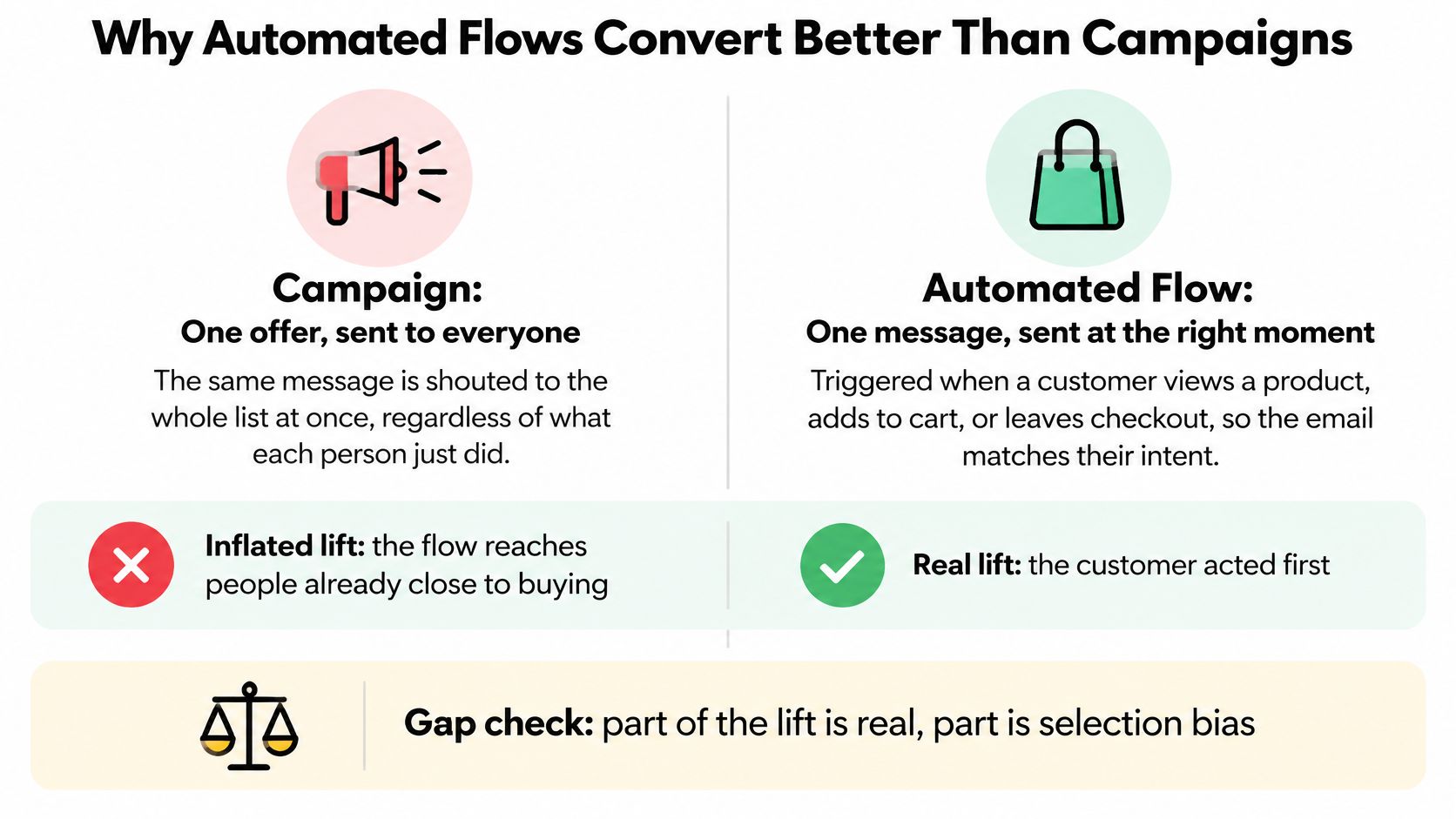
Welcome, browse abandonment, cart abandonment, replenishment, and post-purchase flows trigger after an observable action or lifecycle event. The customer has shown intent, joined your list, bought before, or reached a point where a reminder fits. The email has less guessing to do.
A broadcast goes to people in mixed states. Some are ready to buy, some bought yesterday, and some aren't interested today. The same product and copy will convert differently because the audience isn't in the same place.
The size of the gap is substantial in the Shopify summary of Klaviyo's analysis of more than 183,000 brands, which reports a 0.16% placed-order rate for one-off campaigns versus 2.11% for automated flows, about 13 times higher, with click-through rates of 1.69% and 5.58% respectively.
That doesn't mean every flow causes thirteen times more orders. Flow audiences are already closer to buying, and your platform may credit orders inside its window that would have occurred without the message. Part of the gap is timing. Part is selection bias.
The video below is useful background on building messages around customer timing rather than treating every subscriber as identical.
Run a randomized holdout where that's practical. A small eligible group doesn't get the flow, then you compare its orders with the group that does. Attributed conversion tells you what the platform claimed. Incremental conversion tells you what the email likely caused.
Segment flow results too. Look at first versus repeat purchases, product category, and customer recency before you decide a flow is strong. A replenishment email to loyal buyers shouldn't be judged like a welcome email to new subscribers.
If you want a structured way to think about sequenced messages, read our guide to a drip email campaign. Then audit your own coverage. A missing welcome, browse, or cart flow is often a more sensible fix than adding another weekly broadcast.
Don't ask why a campaign didn't match a cart flow. Ask whether each one beat its own baseline and its holdout.
Counting opens can feel like counting a shop's door chimes instead of sales at the till. The chime tells you something moved near the entrance. It doesn't tell you who came in, what they wanted, or whether they bought anything.

Apple Mail Privacy Protection can load tracking pixels automatically, so reported opens may rise without a confirmed human read. Recent benchmark commentary in Sona's 2025 industry benchmark analysis warns that this privacy behavior inflates opens and points readers toward click and conversion signals instead. Use opens as background context, not your first diagnostic.
Clicks are better, but they aren't profit. People click from curiosity, tap by accident, or hunt for a discount. Some would have purchased without the email. A rising click rate can therefore coexist with flat orders and weaker margin.
Put these measures at the top of your dashboard, in this order.
Read them together. If clicks rise while profit per recipient stays flat, you may be training customers to wait for promotions. If orders rise and complaints rise faster, the short-term win may damage future reach.
Make the review monthly and simple. Pull the five numbers for each major flow, compare each flow with its own prior month, and flag any flow where clicks hold steady but orders fall. That pattern points you past the subject line and toward the offer, page, audience, or checkout.
Start at the top of the funnel. Check delivered recipients and inbox placement first, then clicks, then orders. If fewer people see the email, downstream rates can look like a copy problem when the actual problem happened before anyone could read it.
Delivery and inbox placement aren't the same thing. The measurement guidance in ClickMinded's email marketing benchmarks guide defines delivery rate as messages accepted by the receiving server, while inbox placement measures whether delivered messages reach the inbox rather than spam. A campaign can be delivered and still be largely invisible.
Before you rewrite an underperforming email, test your email deliverability so you can separate placement trouble from weak content. Our guide on email deliverability and avoiding the spam folder covers the sender-side checks that sit behind that result.
| Symptom | Likely Cause | First Fix |
|---|---|---|
| Good clicks, low orders | Landing page or offer mismatch | Align product, price and offer on the landing page |
| High opens, flat clicks | Privacy-inflated opens or weak promise in the body | Ignore open rate; test the opening hook and CTA |
| Normal clicks, orders below benchmark | Price or shipping surprise, checkout friction | Show shipping and total early; review checkout steps |
| Falling delivered-recipient rate, stable clicks | Inactive audience inflating list size | Suppress inactive subscribers and re-engage them |
| Low inbox placement | Authentication gaps or spam-filter triggers | Check SPF, DKIM and DMARC, and review complaint rate |
| Rising unsubscribes after promotions | Promotion frequency too high | Reduce promotional sends and add value-led content |
| Flows convert, campaigns lag | Audience intent mismatch | Compare on the same denominator before concluding |
Don't treat the table as a diagnosis by itself. It's a starting order for investigation. Good clicks and low orders might mean a mismatched page, but they could also mean the email attracted browsers who never intended to buy today.
Change one thing at a time, then re-measure on the same denominator. If you change the audience, offer, and landing page together, you'll see a different number without learning which change mattered.
Start after the click. If the landing page doesn't match the email, you're asking interested shoppers to restart their decision. The steps below work in order, and each one includes the mistake that usually gets in the way.
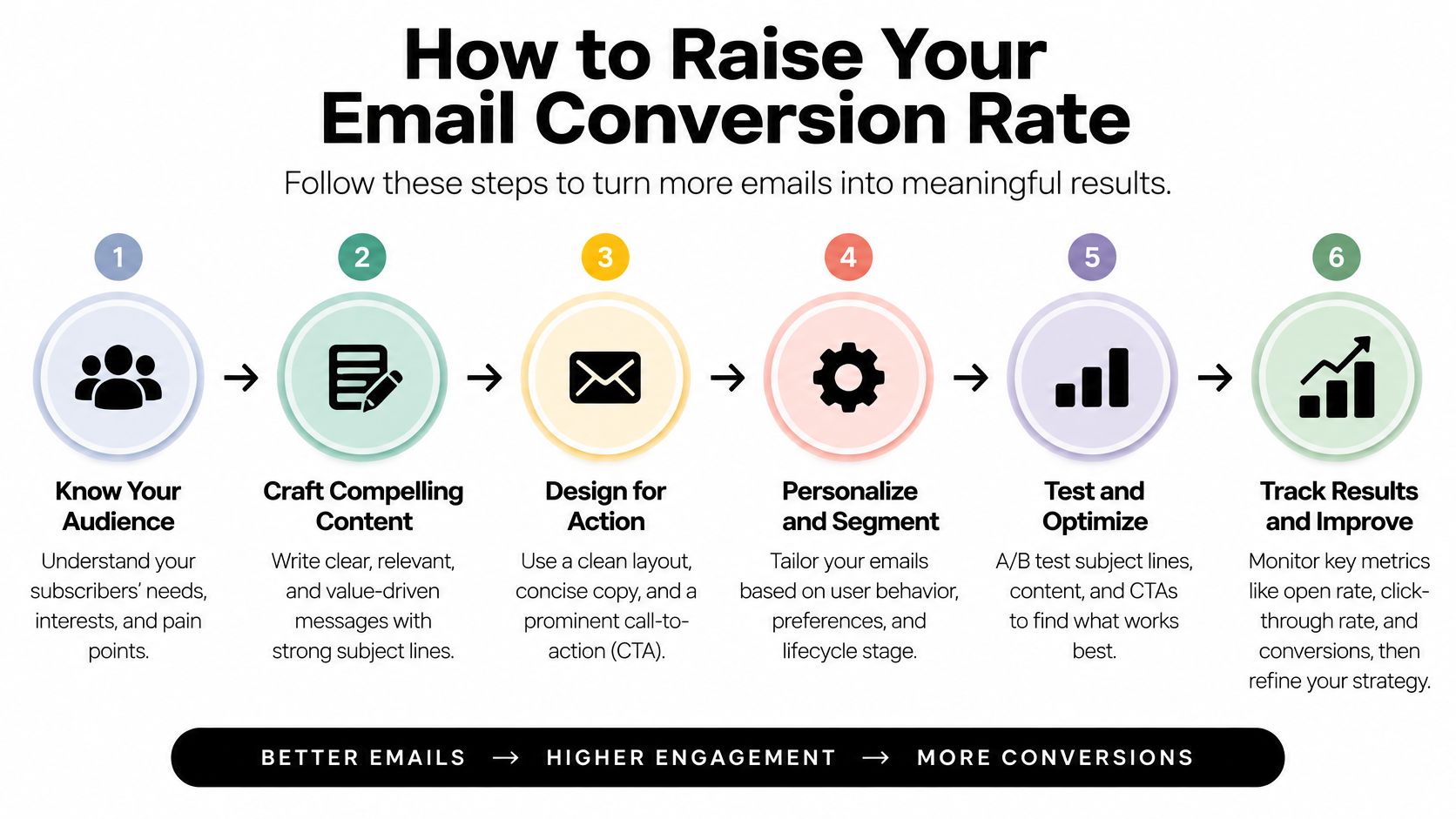
Match the landing page to the email. Show the same product, price, and offer above the fold, using language the reader recognises from the message. Don't send product clicks to a generic collection page and expect shoppers to search again.
Use one primary call to action. Put it high in the email and repeat it once where the message earns another decision point. Competing buttons for a sale, a blog post, and a loyalty program split attention. The common slip is calling every link equally important.
A/B test one variable at a time. Test send time, copy length, or CTA placement, then wait for a clear sample before you decide. Changing the subject line and offer in the same test gives you a winner without a reason. If you need help structuring tests, we run A/B tests on email timing, content depth, and CTA placement.
Segment by where the customer is. New subscribers need a welcome path, recent browsers need relevance to what they viewed, and lapsed buyers may need a reason to return. Don't put browsers into every broad promotion just because they're on the list.
Hold discounts for segments that need them. A discount can lift clicks from people who would have paid full price. Judge it by profit per recipient and repeat purchase, not by click rate alone.
Check inbox placement before rewriting copy. A message in spam can't convert, however strong the offer is. Review authentication, complaints, and inactive subscribers if delivered-recipient conversion falls across several emails at once.
Measure each change for two to four weeks. Use the same denominator and attribution window for the whole test period. One strong week isn't a trend, and one weak send shouldn't undo a flow that's been improving steadily.
For the store side of the same problem, read our guide on how ecommerce brands can optimize conversions. Email can bring the right shopper to the page, but the page still has to finish the job.
The best test isn't the one with the biggest percentage. It's the one you can attribute to a single change, on the same base, without guessing.
A baseline is only useful if two people would calculate it the same way. Write the denominator beside every rate before you compare anything.
That record becomes more useful than any universal benchmark. It shows what your audience does, in your category, under your attribution settings. If the weak spot is your welcome path, Class A Media builds a fully optimized, high-converting Welcome Flow in 5 days. Its email templates also carry a 14-day money-back guarantee, with a refund if they do not boost your email performance.
If your dashboard shows attributed revenue but you cannot state the denominator, window, or incremental lift behind it, fix the measurement first, then the weakest lifecycle flow. Class A Media builds custom email and SMS flows for eCommerce brands across welcome, abandonment, post-purchase, and repeat-purchase moments. Contact Class A Media to discuss building your welcome or lifecycle flows.
Let's build retention system that drive predictable, scalable revenue - without ad spend, without retainers, without guesswork.


The Ultimate Ecommerce Email Marketing Agency
Get in touch: hello@classamedia.com