Blog post
Insights
Drip Email Campaign Guide: How Automated Sequences Work
A drip email campaign is a planned series of emails released over time or triggered by customer behavior, instead of one message sent to everyone at once.
You might already have a welcome email running in Shopify, a cart reminder in Klaviyo, and a newsletter ready to send. The harder question is what happens when the same shopper qualifies for all of them, then buys before the next message arrives.
That's where useful automation starts. Think less about filling an email calendar and more about recognizing what a customer needs now, including when they don't need another promotional message.
Suppose a shopper subscribes to your newsletter, browses your products, and leaves without buying. A welcome message follows, introducing your brand and helping them choose where to start. That's an illustrative drip campaign, not a promise that every subscriber should receive the same timing or content.
The relationship between signup and follow-up is easy to picture.

A broadcast is like turning on a garden hose across the whole garden. A drip sequence is more like directing water toward particular plants as they need it. The important difference isn't using less water or sending fewer emails. It's matching the delivery to the recipient.
A newsletter might announce a new collection to an eligible audience. A sequence continues a conversation that began with an individual action, such as subscribing or buying. For a plain-language companion explanation, CartBoss offers a guide to automated customer follow-ups.
Useful distinction: A broadcast asks what the business wants to announce. A lifecycle sequence asks what this customer needs next.
The commercial roots go back to May 3, 1978, when Gary Thuerk of Digital Equipment Corporation sent an ARPANET promotion to approximately 400 recipients, reportedly generating about $13 million in sales, according to Knak's history of email marketing.
That historical account also traces email's expansion through consumer services during the 1990s and the launches of Eloqua in 1999, ExactTarget in 2000, and Mailchimp in 2001. These developments helped create the infrastructure for automated, event-based communication.
The original promotional message wasn't a modern drip sequence. Its relevance is the direct-response idea underneath it: reach a defined audience, connect the communication to an offer, and evaluate the commercial response.
For your store, lifecycle communication is the more useful lens. A subscriber, an undecided shopper, and a recent buyer have different questions. Your automation should recognize those differences rather than treat every email address as interchangeable.
Before opening a flow builder, sketch the customer's route on paper. A sequence resembles a train timetable: messages are stations, delays determine departures, and branches send passengers toward different destinations.
The diagram gives that route a simple visual shape.
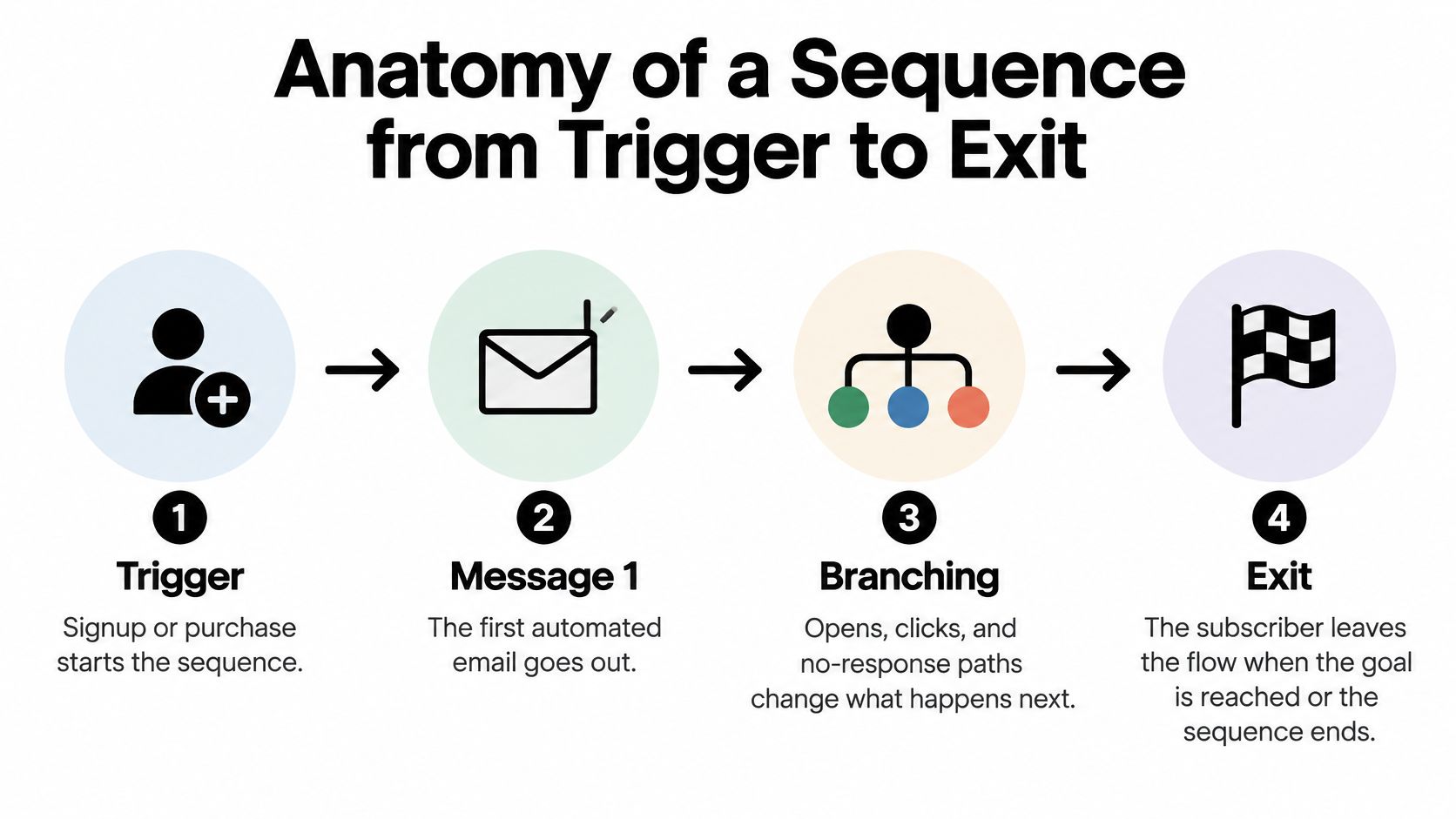
The trigger is the event that starts the sequence. Examples include an eligible newsletter signup, a recognized product view, a checkout that wasn't completed, or a purchase. Entry rules should also confirm that the person is eligible to receive the intended communication.
A trigger and a segment aren't the same thing. The trigger describes what happened; the segment describes who qualifies. A returning customer might take the same action as a new visitor but need different guidance, which is why selecting suitable customer segmentation models matters before you build branches.
Use this planning checklist to connect the moving parts:
A branch is a decision point, not merely a different email design. For example, a shopper who clicks a sizing guide could receive fit guidance rather than another general product introduction. Use observed actions carefully, and don't assume silence explains why someone hasn't purchased.
Exit conditions matter most. A customer who completes checkout should leave recovery messaging rather than continue toward the next scheduled reminder. In the train analogy, someone who has reached their destination gets off.
Recheck eligibility before a delayed message sends, not only when the customer enters. Otherwise, your automation may act on information that was accurate at entry but has since changed.
For a video companion to the workflow, use the embedded walkthrough below.
A sound blueprint should let you explain why someone enters, what they receive, and what makes the sequence stop. If any answer is unclear on paper, adding software won't resolve the underlying decision.
Consider an illustrative shopper exploring a Shopify skincare store. They subscribe because they want help choosing a product, not necessarily because they're ready to buy. After comparing options, they add an item to their cart, complete an order, learn how to use it, and eventually decide whether to replenish.
Those are different lifecycle states. Treating them separately gives each message a clearer purpose.
| Lifecycle stage | Trigger | Message goal |
|---|---|---|
| New subscriber | Eligible newsletter signup | Introduce the brand and help the shopper choose a starting point |
| Interested browser | Recognized product-view activity without a purchase | Resolve a product question and make returning easy |
| Unfinished checkout | Cart or checkout activity without completion | Address friction and help the shopper finish |
| Recent buyer | Completed purchase | Explain product use, care, or what to expect |
| Potential repeat buyer | Relevant replenishment need or complementary-product fit | Support another useful purchase |
| Lapsed customer | Inactivity relative to the store's buying cycle | Establish whether the customer still wants to engage |
For the subscriber, a welcome series can explain what makes the range different and guide product selection. This is a useful place to plan your email welcome series around customer loyalty and the first purchase, rather than assemble unrelated promotional messages.
Browse follow-up needs a lighter touch. Looking at a product signals interest, but it doesn't carry the same meaning as starting checkout. A product explanation or comparison may fit better than an aggressive purchase demand.
The cart stage calls for help with a more immediate decision. A useful recovery message might clarify delivery, returns, or product suitability rather than assume a discount is necessary. Once the shopper buys, the relevant job becomes helping them succeed with the purchase.
Post-purchase education should follow the customer's experience. Instructions that help someone use a product belong near the point of use; a review request belongs after they've had a reasonable opportunity to form an opinion.
For repeat purchases, distinguish replenishment from cross-sell. Replenishment concerns replacing something being used up. Cross-sell concerns a complementary need, so it should be justified by product relevance rather than a generic recommendation.
A customer's next useful message depends on their situation, not on how many emails remain in your template.
Win-back timing needs the same judgment. A consumable and an occasional fashion purchase shouldn't share an inactivity rule just because both stores use Shopify. Map the buying rhythm of your own products before deciding that someone has lapsed.
Behavior-based timing gives you a reason to contact someone beyond the date on your marketing calendar. A shopper who has just considered a product has a different context from someone receiving a general announcement.
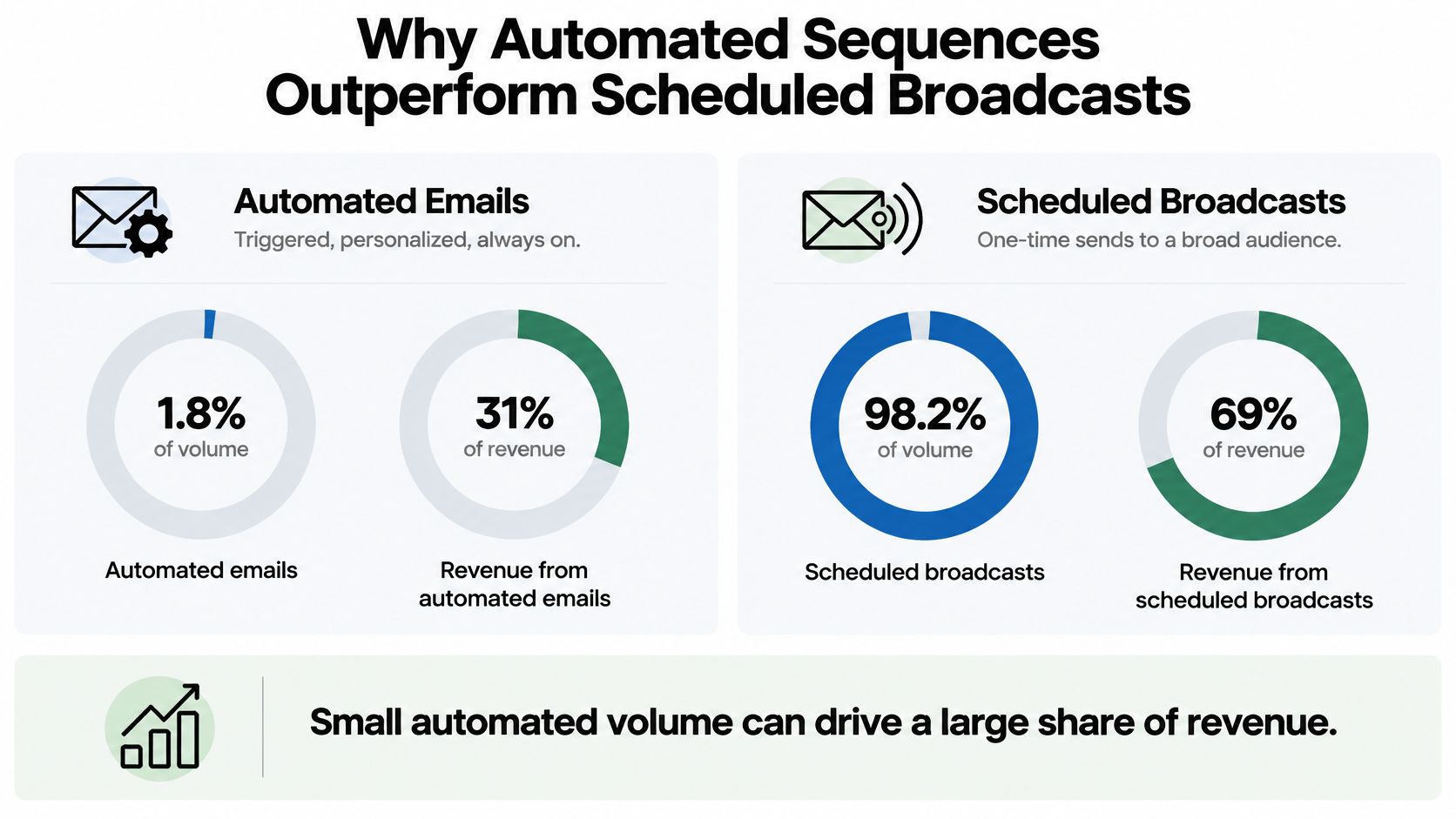
The benchmark pattern is substantial: a research summary reports automated emails at approximately 2% of sends and 37% to 41% of email-generated revenue, with one report listing 48.57% opens for automation versus 25.2% for manual campaigns, as presented in the email marketing research report. These are separate benchmark estimates, not interchangeable measurements from a single campaign.
The visual below illustrates the broad comparison; use the cited figures in the text as the numerical reference.
In a separate ecommerce benchmark, automation generated $3.41 per email sent versus $0.155 for campaign emails, with conversion rates of 1.49% versus 0.08%, according to Omnisend's email marketing benchmarks.
The practical interpretation isn't that automated copy is better. A triggered message reaches someone whose behavior provides context for the offer. A broadcast may reach a broader audience with widely varying levels of purchase intent.
That distinction suggests a sensible investment order:
Your results will depend on your sector, list quality, deliverability, offer, creative, and attribution method. A strong industry comparison doesn't tell you what your store will earn or which flow deserves the most investment.
There's also a difference between receiving credit for a sale and causing an additional sale. High-intent shoppers may have purchased without a reminder. Treat reported automation revenue as a reason to investigate the opportunity, not proof that every attributed order was created by the flow.
Broadcasts still have a role. The useful decision is which communication belongs to an individual customer event and which belongs to a shared announcement.
Even a relevant message can fail if your sending setup isn't trustworthy or your customer receives too many competing follow-ups. Protect the ability to reach the inbox before testing more persuasive subject lines.
Authentication gives mailbox providers a way to evaluate your sending identity. It's foundational infrastructure, not a copywriting improvement.
The main controls serve different purposes:
Bulk-sender guidance emphasizes these controls, domain alignment, and prompt unsubscribe handling; it also identifies complaint rates below 0.1% as the target and 0.3% as a critical threshold, as summarized in Mailgun's deliverability guidance.
You don't need to become a mail administrator, but someone must own these checks. For a practical diagnostic resource, MailGenius explains how to check if emails are going to spam. Broader planning should also account for email deliverability and avoiding the spam folder.
A frequency cap should apply across concurrent promotional flows, not just within each one. Otherwise, individually reasonable sequences can combine into an unreasonable inbox experience. Coordinate SMS as well, because the customer experiences your brand across channels.
Define a priority order. Necessary service and order communications should take precedence over promotional nurture; relevant replenishment messaging may deserve priority over a general sales campaign. Keep transactional and promotional purposes distinct when applying these rules.
Before adding a message: Ask what the customer is already receiving and what you'll withhold to make room for it.
There's a real trade-off to monitor. Research found that automated and transactional messages generally achieved higher click-through and click-to-open rates than scheduled sends while also showing slight increases in unsubscribes and bounces, according to Acoustic's marketing benchmark findings.
Review complaints, bounces, and opt-outs by flow, alongside account-level reporting. If a particular sequence causes problems, investigate its entry rules, audience, timing, and message purpose before assuming the subject line needs changing. Sometimes the right optimization is to slow a sequence down or stop sending it.
Building in-house can make sense when your team understands the products, knows the automation platform, and has time to maintain what it launches. Outsourcing becomes worth considering when the difficulty is coordination across data, messaging, design, and measurement.
The decision isn't whether someone can assemble emails in Klaviyo. It's whether your team can maintain a dependable customer communication system after the initial build.
| Decision criterion | Build in-house when | Consider outside support when |
|---|---|---|
| Platform expertise | Someone can configure and troubleshoot flows | Setup and integration questions block progress |
| Lifecycle coverage | The scope is manageable for your team | Several customer states need coordinated treatment |
| Segmentation | Your audience rules are clear | Data and eligibility rules need restructuring |
| Channel coordination | Email and SMS have a shared owner | Different teams manage competing messages |
| Ongoing operation | Testing and monitoring have assigned owners | Nobody has capacity to maintain the system |
If you're exploring the technical starting point, Securify's guide to set up Klaviyo on Shopify is a useful companion resource. Connecting the tools is a setup task, however, not a substitute for deciding what the flows should do.
Ask your team to describe how it would test a purchase arriving during a delay, an unsubscribe during a sequence, and competing eligibility across flows. Those answers reveal more about readiness than a polished email template.
Class A Media is an outsourcing option for Shopify-focused retention work. Its stated services include custom email and SMS flows, multiple first-purchase touchpoints, segmentation, automated messaging, and AI-powered predictive triggers.
The agency describes a one-time payment model rather than recurring retainers, identifies itself as an official Klaviyo partner, and publishes case studies covering GUIZIO, Kush Queen, and Four Sigmatic. Those examples are relevant to evaluating experience, but they aren't a forecast of your store's results.
Whether you hire an agency or use an internal team, request concrete deliverables:
Predictive features should receive the same scrutiny as fixed rules. Ask what data supports the decision, what happens when that data is missing, and who can override the automation.
Start this week with a customer problem you can describe plainly. An unfinished checkout or a subscriber who needs help choosing a product is a more useful starting point than a target number of emails.
Choose a manageable scope so you can test the complete experience. Launching a carefully checked flow gives you a better foundation than activating a large collection of templates you haven't reviewed.
Use a test profile to inspect the experience from the customer's side. Check the destination links, product details, mobile presentation, and the reason each message arrives. Don't limit testing to whether the automation turns on.
Use clicks, purchases, and revenue per recipient as core measures rather than treating opens as proof of success. Apple Mail Privacy Protection can inflate opens, and measurement remains difficult: 22% of marketers reported trouble measuring or proving email ROI, while 15% reported difficulty measuring personalization's effect, according to Validity's State of Email survey findings.
Set up a randomized holdout group of otherwise eligible customers who won't receive the promotional sequence. Compare outcomes over the same evaluation window so you can assess whether exposure created additional purchases.
Track contribution margin as well as revenue. Account for discounts, refunds, and overlapping SMS activity, and establish how you'll avoid crediting the same order to multiple flows. Separate first-purchase results from repeat-purchase effects so the comparison answers a clear business question.
Your immediate task is to map the first lifecycle trigger for your store. Write its entry rule, intended customer outcome, stopping condition, and holdout approach on the same page before building it.
Class A Media offers custom email and SMS automation built around customer lifecycle states, segmentation, and behavioral triggers. Visit Class A Media to discuss a defined retention project, including which flows your Shopify store needs and how they should work together.
Let's build retention system that drive predictable, scalable revenue - without ad spend, without retainers, without guesswork.


The Ultimate Ecommerce Email Marketing Agency
Get in touch: hello@classamedia.com